Mexon: A Bold Display Font for Digital Branding
It was a late afternoon when I first placed Mexon into the hero section of a boutique website I was redesigning. The font immediately caught my eye—its futuristic curves and assertive weight felt like a perfect match for the brand’s modern, luxury aesthetic. As I adjusted the spacing and tested it across different screen sizes, I realized this wasn’t just another display font; it had a presence that demanded attention without overwhelming the design.
A Futuristic Touch for Web Design
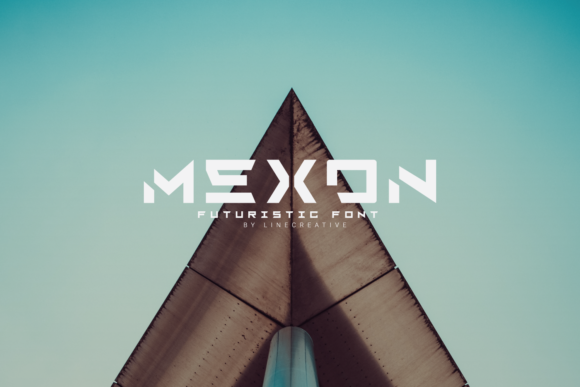
Mexon is a bold, luxurious, and futuristic display font designed to make an impression. Its sleek, angular forms and rich character shapes give it a sense of sophistication and innovation. It feels both contemporary and timeless, making it ideal for digital projects that aim to stand out in a crowded online space.
When I first used Mexon on a product landing page, I noticed how well it balanced with a clean sans serif body font. The contrast between the two created a visual hierarchy that guided the user’s eye naturally from the headline to the supporting content. This kind of balance is essential for readability and engagement, especially on high-traffic pages.
Testing Mexon in Real Web Layouts
I started by testing Mexon in the header of a creative portfolio site. The font’s strong presence worked beautifully as a title, instantly communicating the designer’s bold personality. Next, I applied it to a call-to-action button on a course sales page. While it looked striking, I quickly realized that using Mexon for interactive elements like buttons could be too much—especially if the text was small or the background was dark.
For larger sections, like a hero banner over an image, Mexon performed exceptionally well. Its legibility remained intact even at smaller sizes, which is crucial for responsive web design. I also found that it paired well with subtle gradients and overlays, adding depth without distracting from the main message.
Where Mexon Shines Online
Mexon excels in situations where a strong visual statement is needed. Here are a few places where it truly shines:
- Hero Sections: Its commanding style makes it perfect for headlines that need to grab attention immediately.
- Product Titles: On e-commerce sites, Mexon adds a touch of elegance to product names and descriptions.
- Call-to-Action Areas: When used sparingly, it can elevate the urgency and importance of key actions.
- Logo Text: For brands looking to project confidence and modernity, Mexon offers a unique typographic identity.
- Blog Headers: It works well for titles that set the tone for a post or series.
However, it's important to remember that Mexon is a display font, not a body font. Using it for long paragraphs or dense blocks of text would compromise readability and detract from the overall user experience.
Font Pairing and Accessibility Considerations
To ensure a cohesive look, I paired Mexon with a simple sans serif font like Helvetica Neue for body copy. This combination maintained a clean, professional feel while allowing Mexon to shine in its designated roles. For more editorial or artistic websites, a serif font might work better, depending on the desired mood.
Accessibility is also something to consider. While Mexon looks stunning, it’s best reserved for headings and decorative elements rather than navigation menus or form labels. Ensuring sufficient contrast between the font and background is essential, particularly for users with visual impairments.
Choosing the Right Use Cases
Mexon is not the right choice for every web design scenario. Avoid using it for:
- Long Body Copy: Its decorative nature isn’t suited for extended reading.
- Small Navigation Text: It may become illegible at very small sizes.
- Form Labels: These require clear, readable fonts for usability.
- Dense Dashboards: It doesn’t perform well in data-heavy interfaces.
Instead, focus on using Mexon for short phrases, titles, and accents that benefit from its bold, futuristic flair. This approach ensures that your design remains both stylish and functional.
Before implementing Mexon on any live site or client project, always check the included styles, webfont availability, file formats, and commercial licensing. Ensuring you have the proper rights will help avoid legal issues, especially when selling templates, digital assets, or branded content.